





TL;DR Summary: Handling missing data in Pandas involves understanding NaN values and utilizing functions like fillna(), dropna(), and interpolate() for effective management.
- NaN represents missing data, distinct from None.
- Methods include dropping rows/columns or filling values appropriately.
In applied data science, you will usually have missing data. For example, an industrial application with sensors will have sensor data that is missing on certain days.
You have a couple of alternatives to work with missing data. You can:
- Drop the whole row
- Fill the row-column combination with some value
It would not make sense to drop the column as that would throw away that metric for all rows. So, let’s look at how to handle these scenarios.
NaN means missing data
Missing data is labelled NaN.
Note that np.nan is not equal to Python None. Note also that np.nan is not even to np.nan as np.nan basically means undefined.
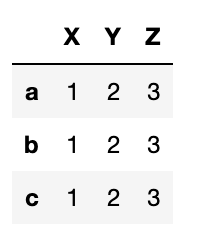
Here make a dataframe with 3 columns and 3 rows. The array np.arange(1,4) is copied into each row.
Results:
nat
    import pandas as pd
import numpy as np
df = pd.DataFrame([np.arange(1,4)],index=['a','b','c'],
columns=["X","Y","Z"])
Results:
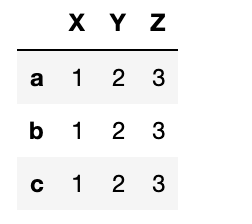
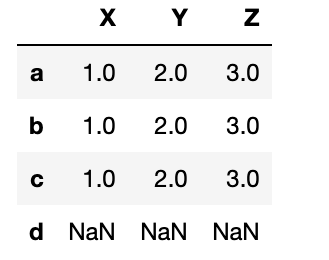
Now reindex this array adding an index d. Since d has no value it is filled with NaN.
df.reindex(index=['a','b','c','d'])
isna
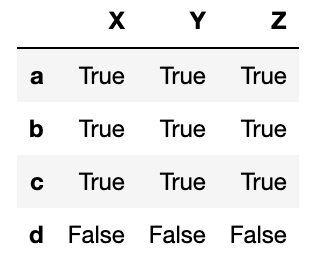
Now use isna to check for missing values.
pd.isna(df)

notna
The opposite check—looking for actual values—is notna().
pd.notna(df)
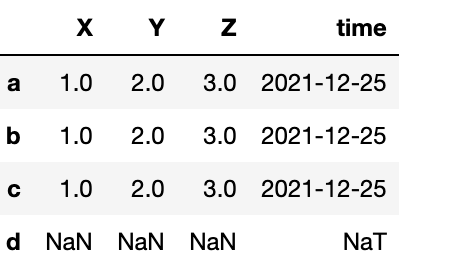
nat means a missing date.
    df['time'] = pd.Timestamp('20211225')
df.loc['d'] = np.nan
fillna
Here we can fill NaN values with the integer 1 using fillna(1). The date column is not changed since the integer 1 is not a date.
df=df.fillna(1)
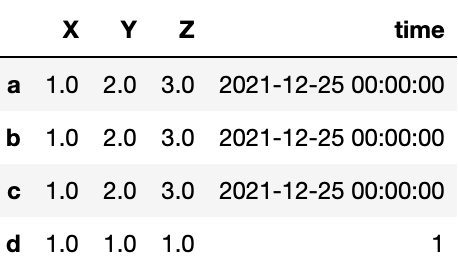
To fix that, fill empty time values with:
df['time'].fillna(pd.Timestamp('20221225'))
dropna()
dropna() means to drop rows or columns whose value is empty. Another way to say that is to show only rows or columns that are not empty.
Here we fill row c with NaN:
    df = pd.DataFrame([np.arange(1,4)],index=['a','b','c'],
columns=["X","Y","Z"])
df.loc['c']=np.NaN
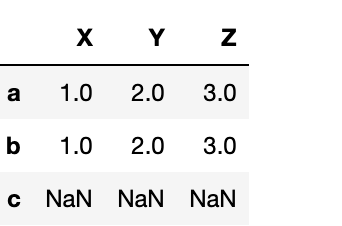
Then run dropna over the row (axis=0) axis.
df.dropna()
You could also write:
df.dropna(axis=0)
All rows except c were dropped:
To drop the column:
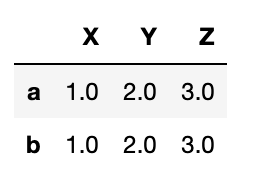
To drop the column:
    df = pd.DataFrame([np.arange(1,4)],index=['a','b','c'],
columns=["X","Y","Z"])
df['V']=np.NaN
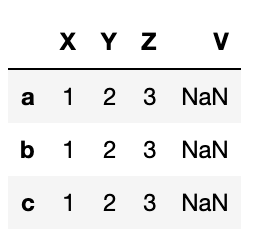
df.dropna(axis=1)
Another feature of Pandas is that it will fill in missing values using what is logical.
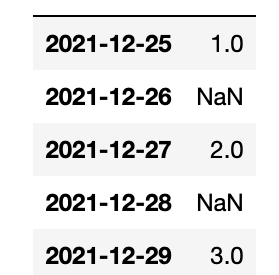
Consider a time series—let’s say you’re monitoring some machine and on certain days it fails to report. Below it reports on Christmas and every other day that week. Then we reindex the Pandas Series, creating gaps in our timeline.
    import pandas as pd
import numpy as np
arr=np.array([1,2,3])
idx=np.array([pd.Timestamp('20211225'),
pd.Timestamp('20211227'),
pd.Timestamp('20211229')])
df = pd.DataFrame(arr,index=idx)
idx=[pd.Timestamp('20211225'),
pd.Timestamp('20211226'),
pd.Timestamp('20211227'),
pd.Timestamp('20211228'),
pd.Timestamp('20211229')]
df=df.reindex(index=idx)
interpolate
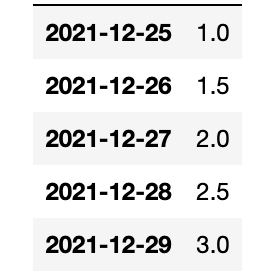
We use the interpolate() function. Pandas fills them in nicely using the midpoints between the points. Of course, if this was curvilinear it would fit a function to that and find the average another way.
df=df.interpolate()
That concludes this tutorial.
Related reading
Pandas Guide
- Pandas Introduction & Tutorials for Beginners
- Pandas: How To Read CSV & JSON Files
- How To Create a Pandas Dataframe from a Dictionary
- How To Group, Concatenate & Merge Data in Pandas
- Pandas Data Types
- Handling Missing Data in Pandas: NaN Values Explained
- NumPy Introduction with Examples
- Using StringIO to Read Delimited Text Files into NumPy
- Using the NumPy Bincount Statistical Function
- Top NumPy Statistical Functions & Distributions
These postings are my own and do not necessarily represent BMC's position, strategies, or opinion.