





TL;DR Summary: NumPy's bincount function efficiently counts unique values in an array, facilitating statistical analysis. The guide includes practical examples and visualizations using Matplotlib to illustrate its application.
- Demonstrates array creation and bincount usage.
- Includes complete code for counting and plotting data.
- Links to additional resources on data visualization and machine learning.
NumPy does a lot more than create arrays. This workhorse also does statistics and functions, such as correlation, which are important for scientific computing and machine learning.
We start our survey of NumPy statistical functions with bincount().
The bincount function
In NumPy, the bincount function counts the number of unique values in an array.
First we make an array with:
- Three 1s
- Two 2s
- Five 4s
- One 5
arr = np.array([1,1,1,2,2,3,4,4,4,4,4,5])
Results in:
array([1, 1, 1, 2, 2, 3, 4, 4, 4, 4, 4, 5])
Then we use the NumPy bincount() function to count unique elements.
d=np.bincount(arr)
Results in an array of counts by index position. In other words, it counts from left to right.
Note the 0 in front. For whatever odd reason, NumPy returns one more bin than the size of the array. So, we will make some adjustments for that.
array([0, 3, 2, 1, 5, 1])
We make an array with unique elements from arr. We do this so we can plot the count against the values later.
a=np.unique(arr)
Results in:
array([1, 2, 3, 4, 5])
Because NumPy returns one more bin than the size of the array, we insert a 0 at the beginning so that the unique count and the bincount are the same shape so we can plot them.
b=np.insert(arr,0,[0])
This gives us:
array([0, 1, 1, 1, 2, 2, 3, 4, 4, 4, 4, 4, 5])
Then we make a unique list out of that:
c=np.unique(b)
Now it has the extra 0 to line up with the bincount
array([0, 1, 2, 3, 4, 5])
Now c and d are the same shape, so we can plot them using Matplotlib.
plt.bar(c,d)
Results in this chart:
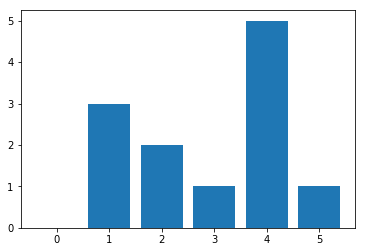
As you can see, there are:
- Five elements with value 0
- One element with value 3
The complete code
Here is the complete code.
    import numpy as np
import matplotlib.pyplot as plt
arr = np.array([1,1,1,2,2,3,4,4,4,4,4,5])
d=np.bincount(arr)
a=np.unique(arr)
b=np.insert(arr,0,[0])
c=np.unique(b)
plt.bar(c,d)
Related reading
Pandas Guide
- Pandas Introduction & Tutorials for Beginners
- Pandas: How To Read CSV & JSON Files
- How To Create a Pandas Dataframe from a Dictionary
- How To Group, Concatenate & Merge Data in Pandas
- Pandas Data Types
- Handling Missing Data in Pandas: NaN Values Explained
- NumPy Introduction with Examples
- Using StringIO to Read Delimited Text Files into NumPy
- Using the NumPy Bincount Statistical Function
- Top NumPy Statistical Functions & Distributions
These postings are my own and do not necessarily represent BMC's position, strategies, or opinion.