




TL;DR Summary: DevOps branching strategies enhance code management and collaboration, enabling faster delivery and better quality in software development. Key strategies include Gitflow, GitHub Flow, Trunk-Based Development, and GitLab Flow.
- Branching strategies help prevent code conflicts and manage source code changes.
- Choosing the right strategy depends on project requirements and development methods.
Branching strategies contribute to setting up or managing a productive DevOps team that can reliably produce quality code. Branching strategy best practices will help you deliver code faster, with fewer issues, and give you the ability to scale as your teams grow.
Branching strategies and version control
Version control is one of the primary components of the DevOps pipeline. It effectively allows the following:
- Managing all source code changes.
- Tracking all code changes.
- Enabling multiple developers to work on the same project simultaneously.
However, if code repositories are not managed properly, they can quickly become bloated and unwieldy, defeating the essential purpose of source control. One of the best ways to keep everything organized is by adhering to DevOps branching strategy best practices for all your development needs.
In this article, we will discuss different branching strategies that can be used to streamline your development experience.
What is a branching strategy in DevOps?
Simply put, a branching strategy is something a software development team uses when interacting with a version control system for writing and managing code. As the name suggests, the branching strategy focuses on how branches are used in the development process.
One major purpose of a version control system is to enable a collaborative development environment without overlapping or affecting the codebase. Each team member modifying the same source code will inevitably be making conflicting code changes. However, using branches can avoid such conflicts with a version control system. These branches allow users to merge their written code to a master branch to create the end product.
Interested in Enterprise DevOps? Learn more about DevOps Solutions and Tools with BMC. ›
Why you need a DevOps branching strategy
A properly implemented branching strategy is the key to creating an efficient DevOps process. DevOps is focused on creating a fast, streamlined, and efficient workflow without compromising the quality of the end product.
A DevOps branching strategy helps define how the delivery team functions and how each feature, improvement, or bug fix is handled. It also reduces the complexity of the delivery pipeline by allowing developers to focus on developments and deployments on the relevant branches—without affecting the entire product.
Determining the best branching strategy for your needs
The selection process for a branching strategy depends on the users and the project requirements. Factors like the development method, scale, and user preferences impact this selection.
Additionally, factors like Continuous Integration/Continuous Delivery (CI/CD) tools decide what branching strategies can be used in your DevOps pipeline. Branching strategies that do not align, or make it more difficult to implement CI/CD in DevOps pipelines, should not be used in a DevOps environment.
A good branching strategy for DevOps should have the following characteristics:
- Provides a clear path for the development process from initial changes to production.
- Allows users to create workflows that lead to structured releases.
- Enables parallel development.
- Optimizes developer workflow without adding any overhead.
- Enables faster release cycles.
- Efficiently integrates with all DevOps practices and tools, such as different version control systems.
- Offers the ability to enable GitOps (if you require it.)

Common DevOps branching strategies
Let’s look at some popular branching strategies currently used in the industry.
Gitflow
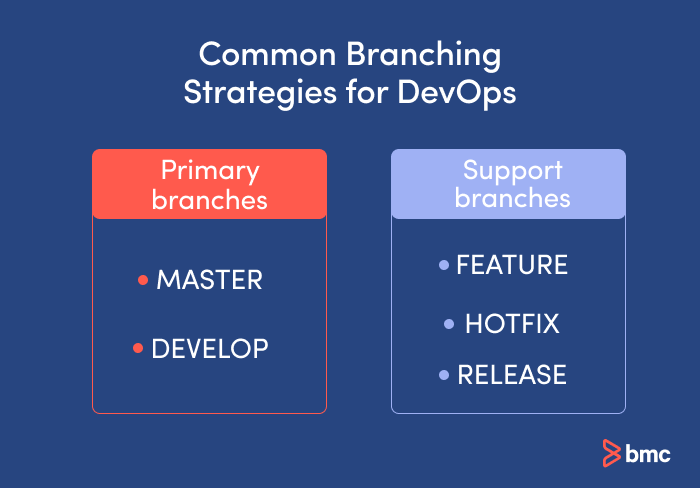
Gitflow is the most widely known branching strategy that takes a multi-branch approach to managing source code. This approach consists of two main branches that live throughout the development lifecycle: master and develop.
Primary Branches
- Master. This is the primary branch where all the production code is stored. Once the code in the “develop” branch is ready to be released, the changes are merged to the “master” branch and used in the deployment.
- Develop. This is where all the actual development happens. All the pre-production code is stored here, and the completed code of all the supporting branches is merged directly to the “develop” branch.
Support Branches
During development, developers create different branches for specific use cases using the “develop” branch as the base. The following are examples of some support branches:
- Feature. This branch is used to develop new features and branches off from the “develop” branch.
- hotfix. This is the branch to deal with production issues where quick fixes are required. It can branch off from the “master” itself, but needs to be merged to both “master” and “develop” branches.
- Release. This branch is used to aggregate fixes and improvements, and prepare for the production release. It will branch off the “develop” branch and merge to both “develop” and “master.”
Advantages of the Gitflow branching strategy
The advantages of the Gitflow branching strategy include:
- Straightforward and separate branches for specific purposes, with a proper naming convention, keep things organized.
- Ideal when handling multiple versions of the production code, as it keeps merges in order.
- Great for enterprise customers who need to adhere to release plans and workflows.
- Clearly defined branches help define the test scope and enable testing of only the specific branches.
- It has widespread support by most Git tools.
Disadvantages of Gitflow branching strategy
Despite the pluses, there are some minuses to using the Gitflow branching strategy. These include:
- Git history becomes unreadable.
- The master/develop split can be redundant in many development scenarios.
- It can be complicated to integrate with CI/CD tools.
- Gitflow is not recommended when users need to maintain a single production version.
- This strategy can overcomplicate the source control, depending on the scope of the project.
GitHub Flow
As the name suggests, this strategy was introduced by GitHub, and aims to provide a simple and lightweight approach to manage development. It adheres to the guidelines below when managing the source control with a single primary branch.
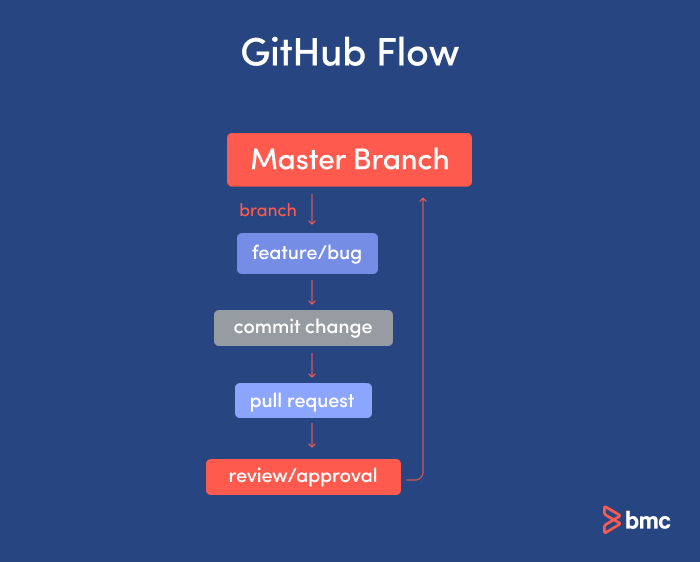
- The primary branch where code is branched off from and merged to is the “master.” Anything in the “master” branch is deployable.
- Any change (feature/bug) is made in a new branch that’s derived from the master, with a descriptive branch name describing the development.
- Commit to the development branch locally and regularly push to the “master” branch.
- Create a pull request once the development is done, so that the code can be reviewed.
- Once the code is reviewed and approved, it must be tested in the branch before merging to the “master” branch.
- From this point, users can immediately deploy the “master” branch with the new changes.
Advantages of the GitHub Flow branching strategy
The GitHub Flow branching strategy has the following advantages:
- Its relatively simple approach with a simple workflow makes it accessible.
- It makes a clean and easily readable Git history.
- It is easy to integrate into CI/CD pipelines.
- Ideal when you need to maintain a single production version.
Disadvantages of using the GitHub Flow strategy
There are disadvantages to using the GitHub Flow branching strategy to consider, as well. These include:
- An oversimplified approach that is not suitable when dealing with release-based developments.
- It’s not suitable when maintaining multiple versions of the code.
- It can lead to unstable production code if the branches are not properly tested before merging with the “master.”
Trunk-Based Development
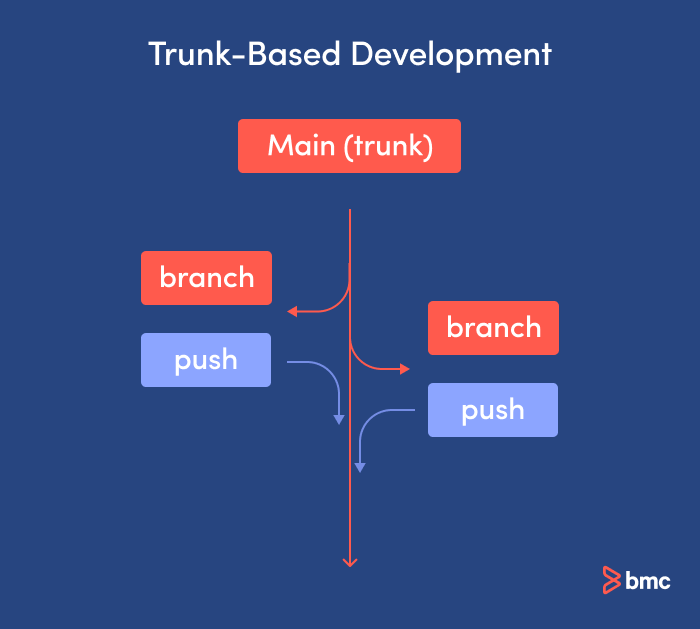
The Trunk-Based Development (TBD) strategy involves developers integrating their changes directly into a shared trunk (master) at least once a day. This shared trunk is always in a releasable state.
Developers can pull from this trunk, create a local repository, and then push the code to the shared trunk. This regular integration enables developers to view each other’s changes quickly and immediately react if there are any conflicts.
Trunk-Based Development
Smaller teams can commit directly to the shared trunk after building and conducting functionality tests. However, for larger teams, development can be broken down into feature/bug fix branches. Developers push code to specific branches continuously, and this code can be verified via pull requests and tested before finally merging into the shared trunk.
This approach enables development teams to both scale seamlessly without overburdening the shared trunk, and maintain all the changes in a more organized and manageable way.
When it comes to deployment, TBD uses feature flags to manage the developments in the shared trunk. Using these feature flags, teams can toggle portions of code on or off for the build process, and deploy only the necessary code in production environments.
Advantages of Trunk-Based Development
The advantages of TBD to consider include the following:
- True continuous integration, as developers constantly keep the trunk updated.
- Excellent choice for CI/CD pipelines because it entails simpler workflows for automated testing.
- Shorter feedback loops for developers because code changes are quickly visible, which leads to faster release cycles.
- Smaller iterations allow teams to keep track of all the changes while reducing code conflicts and improving overall code quality.
Disadvantages of Trunk-Based Development
There are a few disadvantages of TBD, such as:
- Non-experienced developers might find this approach daunting, as they are directly interacting with the shared trunk (master).
- Improperly managed feature flags can lead to issues.
- Shifting to TBD from more traditional methods, such as Gitflow, can be difficult.
The GitLab strategy combines feature-driven development and feature branches with issue tracking. This strategy is similar to GitHub Flow, yet includes environmental branches such as development, pre-production, and production.
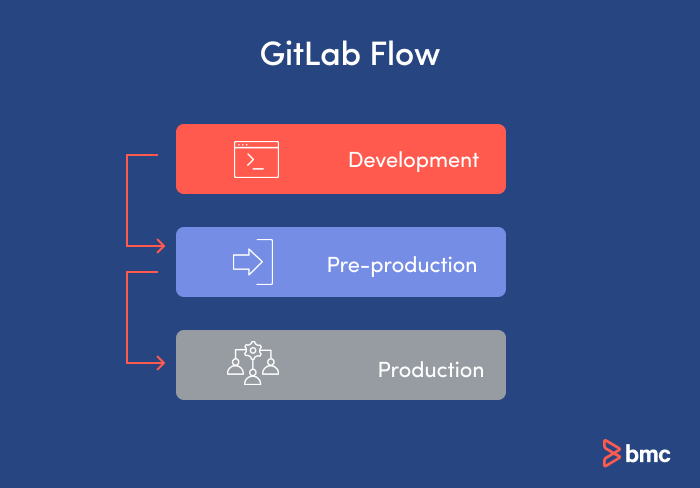
Let’s assume that we have the three environmental branches mentioned above. In that case, the development workflow is:
- Development. This is where all the development happens. Developers create separate branches for the feature/bug fix they are working on, and merge them to this branch. Then it will get reviewed and tested.
- Pre-production. Once the developed features and fixes are ready to be released, the source code up to that point will be merged to a pre-production branch. Then this code will go through additional testing and finally be merged with the production branch to be deployed.
- Production. Once the production-ready code is merged, this branch can be directly deployed in the production environment. This environment branch only contains production-ready code.
Advantages of GitLab branching strategy
The GitLab branching strategy has the following benefits:
- Provides proper isolation between environments and ensures a clean state in the branches.
- Easily integrates into CI/CD pipelines.
- Improves GitHub Flow while streamlining the process for a DevOps environment.
- Easier to read the Git history because it’s cleaner.
Disadvantages of GitLab branching strategy
The GitLab branching strategy has the following disadvantages:
- It can be complex to implement, with the additional overhead of managing environmental branches.
- Development branches can get complicated and messy if not properly managed.
How to choose your branching strategy
The branching strategies mentioned above are tried and tested strategies that can be used to manage your source code. However, each has its own strengths and weaknesses.
The traditional Gitflow is not ideal for rapidly evolving DevOps environments. The other strategies described here try to improve Gitflow and modernize it to fit an agile DevOps process. So, as always, you have to select the best strategy that satisfies all your requirements and suits your organizational practices.
DevOps Guide
- What Is DevOps? A Comprehensive Introduction
- A Brief History of DevOps
- Introduction to DevOps Architecture
- Automation in DevOps: Why and how to automate DevOps practices
- What Is CI/CD? Continuous Integration & Continuous Delivery Explained
- How to Build a CI/CD Pipeline Using Jenkins
- DevOps Metrics for Optimizing CI/CD Pipelines
- Continuous Delivery Metrics
- Is Continuous Integration to Continuous Deployment a Progression - or Not?
- Differences Between Continuous Integration (CI), Delivery (CD), and Deployment
- Source and Version Control in DevOps
- What is Continuous Testing?
- Test Automation Frameworks: The Ultimate Guide
- Release Management in DevOps
- Explained: Monitoring & Telemetry in DevOps
- Application Performance Management in DevOps
- DevOps Orchestration in the SDLC
- Introduction To Database DevOps
- The Role of Microservices in DevOps
- The Role of Virtualization in DevOps
- Containers & DevOps: How Containers Fit in DevOps Delivery Pipelines
- What Is a Container Pipeline?
- What is a DevOps Toolchain?
- Managing Containers and Code for DevOps
- The Role of Agile in DevOps
- The Role of Cloud in DevOps
- What is FinDevOps?
- Top DevOps Trends in 2022
- DevOps Values & Principles
- DevOps Metrics and KPIs
- DevOps Advice for Small, Medium, & Large Organizations
- DevOps Team Structure
- Top DevOps Books to Read Today
- Book Review of The Phoenix Project: DevOps For Everyone
- DevOps Influencers: 11 DevOps Experts to Follow on Twitter
- GitHub, GitLab, Bitbucket & Azure DevOps: What’s The Difference?
- Best Practices: How To Architect Applications for Kubernetes
- Configuration Management in DevOps
- DevOps Branching Strategies Explained
- DevOps Job Titles, Roles, & Responsibilities
- Testing in DevOps: Concepts, Best Practices & More
- The Complete DevOps Certifications Guide for 2022
- What Is The Kubernetes Operator Pattern?
These postings are my own and do not necessarily represent BMC's position, strategies, or opinion.