





TL;DR Summary: Snowflake Window Functions allow complex calculations across rows without aggregation. This tutorial explains key features like OVER(), PARTITION BY, and ORDER BY, demonstrating their use in calculations such as running totals and rankings.
- Window functions differ from traditional SQL GROUP BY.
- Utilizes OVER() to define the window for calculations.
Snowflake supports windows functions. Think of windows functions as running over a subset of rows, except the results return every row. That's different from the traditional SQL group by where there is one result for each group.
A windows function could be useful in examples such as:
- A running sum
- The average values over some number of previous rows
- A percentile ranking of each row among all rows.
The topic of window functions in Snowflake is large and complex. This tutorial serves as a brief overview and we will continue to develop additional tutorials.
Snowflake definitions
Snowflake defines windows as a group of related rows. It is defined by the over() statement. The over() statement signals to Snowflake that you wish to use a windows function instead of the traditional SQL function, as some functions work in both contexts.
A windows frame is a windows subgroup. Windows frames require an order by statement since the rows must be in known order.
Windows frames can be cumulative or sliding, which are extensions of the order by statement. Cumulative means across the whole windows frame. Sliding means to add some offset, such as +- n rows.
A window can also have a partition statement. A partition is a group of rows, like the traditional group by statement.
Windows vs regular SQL
For example, if you grouped sales by product and you have 4 rows in a table you might have two rows in the result:
Windows function
Order by
Regular SQL group by
    select count(*) from sales group by product:

10 product A
20 product B
With the windows function, you still have the count across two groups but each of the 4 rows in the database is listed yet the sum is for the whole group, when you use the partition statement.
    count 10 product A
count 10 product A
count 20 product B
count 20 product B
Create some sample data
To study this, first create these two tables.
    CREATE TABLE customers
  (
     customernumber     varchar(100) PRIMARY KEY,
    customername varchar(50),
    phonenumber varchar(50),
    postalcode varchar(50),
    locale varchar(10),
    datecreated date,
    email varchar(50)
  );


CREATE TABLE orders
  (
     customernumber     varchar(100) PRIMARY KEY,
    ordernumber varchar(100),
    comments varchar(200),
    orderdate date,
    ordertype varchar(10),
    shipdate date,
discount number,
quantity int,
    productnumber varchar(50)
)
Then paste in this SQL data. The top of the data looks like this:
    insert into customers (customernumber,customername,phonenumber,postalcode,locale,datecreated,email) values ('440','tiqthogsjwsedifisiir','3077854','vdew','','2020-09-27','[email protected]');

insert into orders (customernumber,ordernumber,comments,orderdate,ordertype,shipdate,discount,quantity,productnumber) values ('440','402','swgstdhmju','2020-09-27','sale','2020-10-01','0.7005950240358919','61','BB111');

insert into customers (customernumber,customername,phonenumber,postalcode,locale,datecreated,email) values ('802','hrdngzutwelfhgwcyznt','1606845','rnmk','','2020-09-27','[email protected]');

insert into orders (customernumber,ordernumber,comments,orderdate,ordertype,shipdate,discount,quantity,productnumber) values ('802','829','jybwzvoyzb','2020-09-27','sale','2020-10-06','0.3702248922841853','75','FF4444');

insert into customers (customernumber,customername,phonenumber,postalcode,locale,datecreated,email) values ('199','ogvaevvhhqtjcqggafnv','8452159','hyxm','','2020-09-27','[email protected]');
Partition by
A partition creates subsets within a window. Here, we have the sum of quantity by product.
    select customernumber, ordernumber, productnumber,quantity,
        sum(quantity) over (partition by productnumber) as prodqty
               from orders
               order by ordernumber
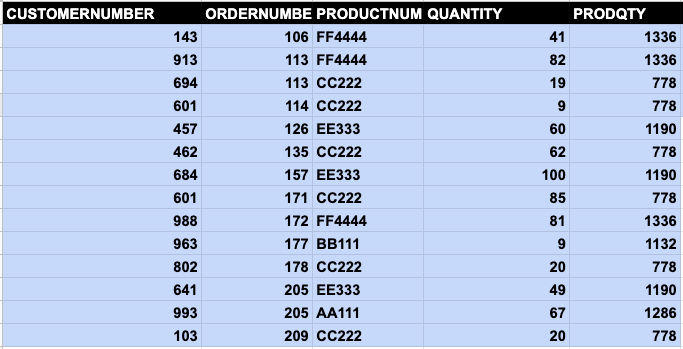
This produces the same results as this SQL statement in which the orders table is joined with itself:
    select customernumber,
        ordernumber,
        productnumber,quantity,
        (select sum(quantity) from orders as o2 where o1.productnumber = o2.productnumber) as prodqty
               from orders as o1
         order by ordernumber
The sum() function does not make sense for a windows function because it’s is for a group, not an ordered set. Yet Snowflake lets you use sum with a windows frame—i.e., a statement with an order() statement—thus yielding results that are difficult to interpret.
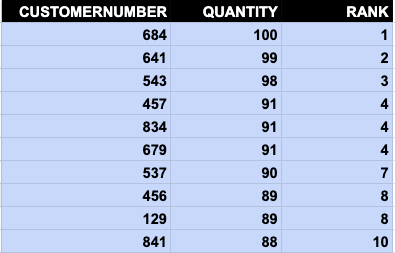
Let's look at the rank function, one that is relevant to ordering. Here, we use a windows function to rank our most valued customers. These are the ones who have made the largest purchases.
The rank() function takes no arguments. The window is ordered by quantity in descending order. We limit the output to 10 so it fits on the page below.
select customernumber, quantity, rank() over (order by quantity desc) from orders limit 10
Here is the output. The customer who has purchases the most is listed first.
Additional resources
For more tutorials like this, explore these resources:
Snowflake Guide
- Snowflake 101: Intro to the Snowflake Data Cloud
- How To Import Amazon S3 Data to Snowflake
- How To Query JSON Data in Snowflake
- Loading CSV Files from S3 to Snowflake
- Snowflake: Using Analytics & Statistical Functions
- Snowflake Window Functions: Partition By and Order By
- Snowflake Lag Function and Moving Averages
- Snowflake SQL Aggregate Functions & Table Joins
- User Defined Functions (UDFs) in Snowflake
- Creating & Using Snowflake Streams
- Using Stored Procedures in Snowflake
- Snowflake vs Redshift: What’s The Difference & How To Choose?
These postings are my own and do not necessarily represent BMC's position, strategies, or opinion.