




TL;DR Summary: Kubernetes uses Port, TargetPort, and NodePort configurations to manage containerized applications. Port exposes services within the cluster, TargetPort directs requests to specific pod ports, and NodePort provides external access via the node's IP address.
- Kubernetes automates container management, scaling, and monitoring.
- Understanding port configurations is crucial for effective application deployment and management.
Kubernetes and ports
Kubernetes is an open-source tool that orchestrates containerized applications. The Kubernetes tool makes sure that containers are running correctly by monitoring pods across different servers or nodes.
It automatically manages responses to container failure, restarting or replacing pods when necessary. It scales them up or down, based on demand, and distributes the computing load across containers to balance the work. It eliminates the manual work of managing, scaling, and maintaining large and complex applications.
Kubernetes uses networking, including ports and services, to facilitate communication between pods and other resources.
Kubernetes Services port configurations: Port vs TargetPort vs NodePort
In Kubernetes there are several different port configurations for Kubernetes services:
- Port exposes the Kubernetes service on the specified port within the cluster. Other pods within the cluster can communicate with this server on the specified port.
- TargetPort is the port on which the service will send requests to, that your pod will be listening on. Your application in the container will need to be listening on this port also.
- NodePort exposes a service externally to the cluster by means of the target nodes IP address and the NodePort. NodePort is the default setting if the port field is not specified.
Let’s look at how to use these ports in your Kubernetes manifest.
Using Port, TargetPort, and NodePort in Kubernetes
    apiVersion: v1
kind: Service
metadata:
name: hello-world
spec:
type: NodePort
selector:
app: hello-world
ports:
- protocol: TCP
port: 8080
targetPort: 80
nodePort: 30036
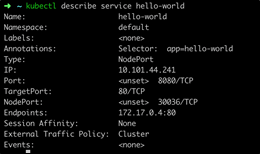
From the above examples the hello-world service will be exposed internally to cluster applications on port 8080 and externally to the cluster on the node IP address on 30036. It will also forward requests to pods with the label “app: hello-world” on port 80.
The configuration of the above settings can be verified with the command:
$ kubectl describe service hello-world
Create a pod running nginx to which the service will forward requests to:
    apiVersion: v1
kind: Pod
metadata:
name: nginx
labels:
app: hello-world
spec:
containers:
- name: nginx
image: nginx
ports:
- containerPort: 80
To test and demonstrate the above configuration, we can create a pod running an ubuntu container to execute some curl commands to verify connectivity.
$ kubectl run -i --tty ubuntu --image=ubuntu --restart=Never -- sh
From this pod run the following commands:
Curl the service on the ‘port’ defined in the Kubernetes manifest for the service.
$ curl hello-world:8080
This proves that curling the Kubernetes service on port 80 forwards the request to our nginx pod listening on port 80.
To test the NodePort on your machine (not in the ubuntu pod) you will need to find the IP address of the node that your pod is running on.
$ kubectl describe pod nginx
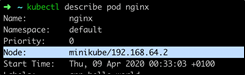
Now, you can curl the Node IP Address and the NodePort and should reach the nginx container running behind the Kubernetes service.

Conclusion
Mastering Kubernetes, especially the use of pods and ports, is essential for efficiently managing containerized applications at scale. As Kubernetes continues to evolve and its adoption grows across industries, understanding how to configure and optimize networking within the platform will empower you to deploy, manage, and scale applications with greater precision and reliability.
Kubernetes Guide
- What is Kubernetes (K8s)? A Kubernetes Basics Tutorial
- Kubernetes Best Practices for Enhanced Cluster Efficiency
- Best Practices: How To Architect Applications for Kubernetes
- Kubernetes Pods: An Introduction
- Kubernetes ReplicaSets: A Brief Introduction
- Kubernetes Deployments Fully Explained
- How To Use & Manage Kubernetes DaemonSets
- How Kubernetes Services Work
- Using Kubernetes Port, TargetPort, and NodePort
- Creating & Using ConfigMaps in Kubernetes
- Introduction to Kubernetes Secrets
- Kubernetes Networking Basics
- Kubernetes Ingress Explained
- Introduction to Kubernetes Helm Charts
- What Is The Kubernetes Operator Pattern?
- Deploying PostgreSQL as a StatefulSet in Kubernetes
- Kubernetes Custom Resource Definition (CRDs) Explained
- 3 Kubernetes Patterns for Cloud Native Applications
- Kubernetes Compute Resources Explained
- Kubernetes Security for DevOps Pipelines
- Using Spinnaker with Kubernetes for Continuous Delivery
- Kubernetes Multi-Clusters: How & Why To Use Them
- Kubernetes Monitoring: A Comprehensive Guide
- Kubernetes vs Docker: A Quick Comparison
- Kubernetes vs Docker Swarm: Comparing Container Orchestration Tools
- Kubernetes vs OpenShift: What’s The Difference?
- Kubernetes Certifications: How and Why to Get Certified
These postings are my own and do not necessarily represent BMC's position, strategies, or opinion.