Let us know how we can help
Sales & Pricing
Speak to a rep about your business needs

Help & Support
See our product support options
General inquiries and locations
Contact us


The governed AI playbook
How to run agentic AI inside workflows your business already trusts.
AI makes Control-M smarter. Control-M makes AI production-ready.

When AI enters the workflow,
the rules get tested, not replaced
Control-M has kept complex workflows running in the right order for two decades. Generative and agentic AI are now one more thing inside that workflow, and neither behaves like everything else.
The pattern holds across every play in this book: AI analyzes, explains, and recommends. Control-M checks and logs the result.
These five plays show how to bring it in without replacing what already works.
1
See the new physics
2
Find fragmentation before it finds you
3
Build one control plane, not ten workarounds
4
Govern AI like you govern everything else
5
Move from pilot to production without starting over
01
See the new physics
Why deterministic workflows can’t absorb probabilistic AI on their own.
Payroll runs, card settlements, airline schedules: they work because every step behaves the same way, every time. Generative AI doesn’t. A model on Amazon Bedrock might recommend an action or triage an incident, and give you a different answer tomorrow.
Most explanations for stalled AI pilots blame trust or integrations. The real reason is simpler: governance was built for a fixed approval chain, and a probabilistic step has nowhere to attach to it. Control-M gives it somewhere to attach, propose, check, log, the same discipline as everything else in the pipeline.
02
Find fragmentation before it finds you
The real failure mode isn’t a bad model, it’s a blind spot.
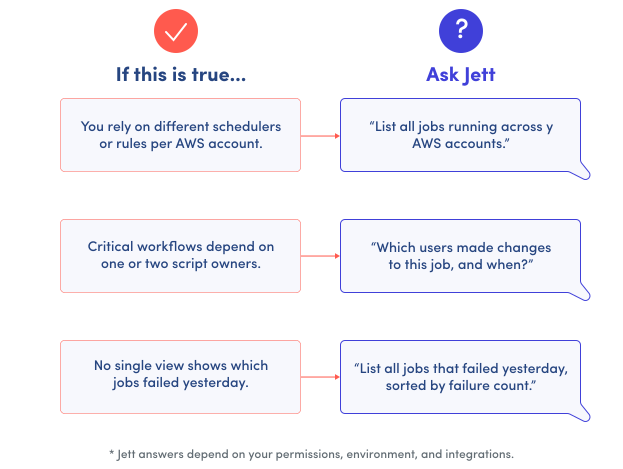
Most orchestration breaks quietly. Multiple schedulers operating in silos, scripts filling the gaps, and manual job launches scattered across the business. Nobody notices until payroll misses a run or a settlement job fails.
Layer AI on top of that and the blind spots get worse. A model recommending a fix or triaging an incident is only as good as the visibility it’s working with. If the underlying pipeline is already a black box, adding AI adds another moving part to a system nobody can fully see.
Run the check to the right before you add anything new. Jett, Control-M’s built-in AI advisor, can answer each one directly, no digging through logs required.
03
Build one control plane, not ten workarounds
A single view across AWS, data, and AI
Applications, data pipelines, and AI workloads usually run on separate schedulers with separate rules. Each one grew up solving its own problem, so each has its own visibility, its own failure points, and its own person who knows how it actually works. That’s fine until something breaks across the seam between them, and nobody owns the whole picture.
Control-M replaces that patchwork with one control plane: one execution model, one SLA model, across all three. A workflow that invokes Amazon Bedrock runs inside it the same way. It’s a first-class Control-M job, not a black box sitting outside the pipeline.
| Domain | What this usually looks like | With Control-M |
|---|---|---|
|
Applications |
Multiple scheduling tools plus a mix of AWS Lambda triggers, each team managing its own |
One platform, shared execution and SLA model |
|
Data Pipelines |
AWS Glue jobs and Snowflake tasks stitched together with separate error handling |
Orchestrated end to end, dependencies and recovery handled centrally |
|
AI Workloads |
Workflows invoking Amazon Bedrock, running as one-off scripts disconnected from everything else |
Governed jobs with the same SLAs, approvals, and audit trail as everything else |
03
AWS powers the cloud.
BMC orchestrates the outcomes.
AWS provides the platform AI runs on. Control-M provides the discipline that keeps it trustworthy once it’s running. Neither replaces the other; that’s what makes it work. AI Pilot watches execution, surfaces root causes when something fails, and recommends fixes.
Already building in AWS?
Point Control-M at your existing workflow that invokes Amazon Bedrock. AWS IAM handles the connection, no new integration to build.
Already running Control-M?
Adding an Amazon Bedrock- powered workflow works the same as adding any other job type: same SLA, same authorization, same audit trail.
TRY IT: Whichever side you’re starting from, name a workflow you’d bring under this governance.
Not sure which one yet? Play 5 walks through how to find it.
CASE STUDY

Air Europa soars with DataOps powered by Control-M
700+
employees certified in data literacy
120+
BI and data solutions running
54%
increased DataOps workflow efficiency
“Control-M SaaS gives us immediate access to out-of-the-box integrations with Amazon SageMaker, a critical enabler of our Data, ML, and AI roadmap.”
José Carlos Bermejo Rubio, Head of Data & Analytics, Air Europa
03
AI Workflow Creator: From intent to working design
Named a workflow? Here’s how you’d actually build it.
You don’t need to know Control-M’s technical constructs to build a governed workflow. You need to describe what you want. Say it in plain language, and the AI Workflow Creator proposes the structure, ready to review and refine before it goes live. Control-M governs it exactly like anything an expert built by hand.
1
Describe what you want, in plain language
2
Review the workflow it proposes
3
Refine and activate, governed like everything else
TRY IT: Swap our prompt for a workflow you actually need. That’s what gets proposed the next time you open this.
04
Govern AI like you govern everything else
Control-M is not an AI platform or an agent-building tool.
It’s the same governance layer already running everything in your environment today, deterministic jobs and AI-driven steps alike, under one set of controls. The Control-M MCP Server extends that governance outward: it gives external agents, like Claude Desktop, Cursor, or VS Code, a standards-based way to reach into Control-M instead of working around it. Every proposed action runs through Control-M’s existing authorization, SLA, audit trail, and rate limits— the same controls already applied to human-initiated work, not a separate approval process built just for AI.
Here's how to set one up
01
Discover
Connect an agent, Claude Desktop, Cursor, VS Code, to Control-M through MCP Server. It can read your workflows, jobs, and status directly, no custom integration code required.
TRY IT: Ask your agent what failed in your environment yesterday, and watch it answer without you opening a single log.
02
Act
The agent proposes exactly one action at a time: trigger a job, investigate a failure, request a rerun. It doesn’t execute anything on its own
TRY IT: Give it one real failure from this week and see what it proposes before it touches anything.
03
Govern
You approve or reject what it proposed. That decision, and everything that led to it, runs through the same SLA and audit trail as work a person kicked off. MCP Server also caps how many agents can connect at once and how many requests they can send per minute, so nothing floods the system even inside its approved scope.
TRY IT: Look at the audit entry after you approve. That’s the record a compliance review would pull.
04
A governed sandbox for building trust in AI, not just running it
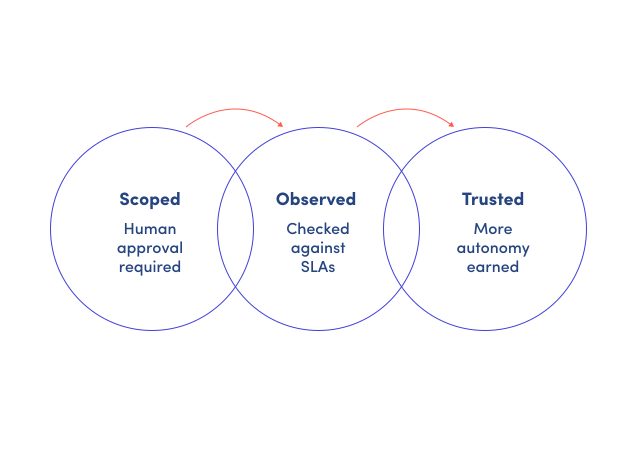
There’s no separate AI sandbox to build and then retire. You’re tuning permissions on the same governed workflow the agent will eventually run at full scale, not a throwaway copy of it. Start scoped: the same authorization, SLA, audit trail, and rate limits Control-M already enforces apply from the first action. Watch how it performs. Then widen what it’s allowed to do on its own as it earns that trust.
One governance model, three vantage points
CIO / VP IT
Description – AI enters mission-critical operations without opening a new, hard-to-audit channel. Risk, SLAs, and governance stay on one plane.
Data & AI lead
Description – Amazon Bedrock-driven steps stop being opaque production risks. Recommendations run through a control layer you can inspect and tune.
Platform / Cloud Engineering
Description – Automation sprawl across AWS services comes under control. Agents and humans share one interface, not another point tool to secure.
05
Move from pilot to production without starting over
Moving from pilot to production doesn’t mean starting over. Each stage builds directly on the one before it. If you named a workflow back in Play 3, here’s how to check it’s actually the right one, and if you didn’t, here’s how to find it.
Control-M governance layer
Authorization, SLA, audit, and rate limits apply throughout
05
Find your first AI-ready workflow in three steps:
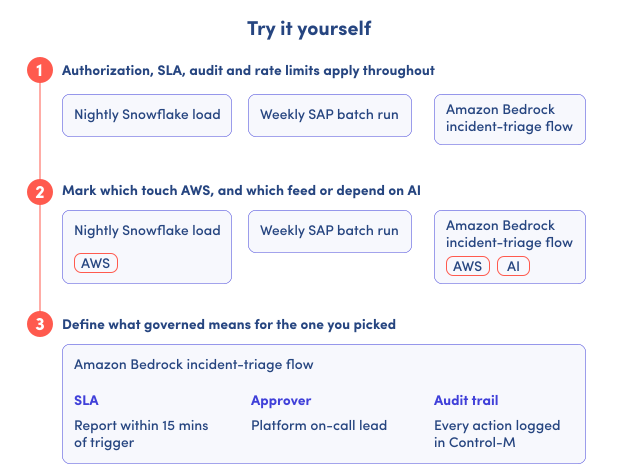
The example below shows what finding a workflow looks like end to end: three real candidates, tagged for what they touch, narrowed down to the one worth governing first.
Run the same three steps against your own environment. You’ll walk away with the workflow, the SLA, the approver, and the audit trail it needs, before you write a single line of Amazon Bedrock integration.
-
Identify three candidates.
Our example starts with a nightly Snowflake load, a weekly SAP batch run, and an Amazon Bedrock incident-triage flow.
-
Identify their AWS and AI connections.
In this example, the Snowflake load uses AWS, and the Amazon Bedrock flow uses both AWS and AI. The SAP batch run has neither connection marked.
-
Choose one and define its governance requirements.
For the Amazon Bedrock incident-triage flow, the SLA requires a report within 15 minutes of the trigger, the platform on-call lead is the approver, and every action is logged in Control-M.
AI creates intent. Agents plan action.
Control-M governs execution.
That’s the loop this playbook walked through: Jett and AI Pilot make Control-M smarter, AI Workflow Creator turns plain language into a working design, MCP Server lets outside agents propose action the same way, and Control-M for Amazon Bedrock runs the result as a governed job. None of it replaces what you already trust. It extends it.
What happens after an AI agent takes action?
Get hands-on with a live environment and see how Control-M keeps AI-driven workflows governed, auditable, and on-SLA.
Ready to deploy?
Find Control-M SaaS in AWS Marketplace and draw down your committed AWS spend.