Let us know how we can help
Sales & Pricing
Speak to a rep about your business needs

Help & Support
See our product support options
General inquiries and locations
Contact us


 Control-M + Tableau
Your Tableau analytics workflow starts before an extract refresh or flow ever executes — and it can fail when something upstream breaks. An AWS S3 dataset arrives late. A Snowflake transformation misses its reporting window. Control-M orchestrates the full chain: data arrival, transformation, Tableau execution, and downstream delivery.
common workflow issues
Does this sound like your week?
These aren’t edge cases. They’re the normal operating conditions for teams running Tableau workflows across multiple tools. Here’s how Control-M handles each one.
DATA FRESHNESS
Your 7:00 AM dashboard refreshed. Snowflake finished at 7:12.
Control-M makes Tableau execution dependent on successful upstream processing instead of an independent clock. The refresh starts only after required jobs complete, preventing business users from opening a dashboard populated with yesterday’s data.
REFRESH FAILURE
The Tableau data source refresh failed. The morning report still went out.
Control-M monitors Tableau job status, detects unsuccessful execution, and prevents dependent workflow steps from proceeding. Configurable recovery and notification logic keeps stale or incomplete analytics from silently moving into downstream business processes.
FLOW DEPENDENCY
Your Tableau flow is ready. Its source data isn’t.
Control-M coordinates upstream jobs and Tableau execution in one workflow, releasing the Tableau flow only after required dependencies complete. Teams replace disconnected schedules with dependency-driven execution and avoid processing data that is incomplete or late.
SLA RISK
Finance needs the dashboard by 8:00. The pipeline is already slipping.
Control-M tracks the Tableau job as part of the end-to-end business SLA, exposing delays across upstream and downstream dependencies. Teams can identify deadline risk earlier and intervene before delayed data becomes a missed reporting commitment.
MANUAL RECOVERY
The 2:13 AM refresh failed. Someone has to restart it manually.
Control-M centralizes Tableau execution with the surrounding workflow, monitors job completion, and applies defined recovery logic when processing fails. Operations teams spend less time chasing individual schedules while business owners get more predictable analytics delivery.
INTEGRATION FACTS
Control‑M + Tableau
|
Platform & OS coverage |
Tableau Cloud · Tableau Server · Tableau REST API endpoints · cloud and hybrid Control-M workflows |
|
Job types supported |
Refresh Data Source · Run Flow |
|
SLA monitoring & alerting |
Tableau job SLA attachment · end-to-end SLA tracking · dependency-aware monitoring · failure notification · deadline visibility |
|
Audit trail & access controls |
secure connection profiles · personal access token credentials · external-vault support · job status · results and output monitoring |
end-to-end orchestration
One production workflow. Every tool in the stack.
Control-M orchestrates workflows across Tableau, Snowflake, Databricks, dbt, file transfers, and cloud services in a single job flow — with dependency tracking, SLA visibility, and automated recovery across all of them.
- Cross-tool dependency: Snowflake → dbt → Tableau flow → analytics handoff
- Data-aware triggers: file arrival, API event, upstream job completion, data-source readiness
|
Tableau |
Run Flow · Refresh Data Source · status monitoring · SLA attachment |
|
Snowflake |
SQL workloads · data dependencies · completion-driven handoff |
|
Databricks |
job orchestration · completion tracking · downstream dependency |
|
dbt |
transformation workflow · completion dependency · analytics handoff |
|
Managed File Transfer |
secure file delivery · arrival dependency · transfer status |
|
Cloud services |
upstream processing · event coordination · cross-platform dependencies |
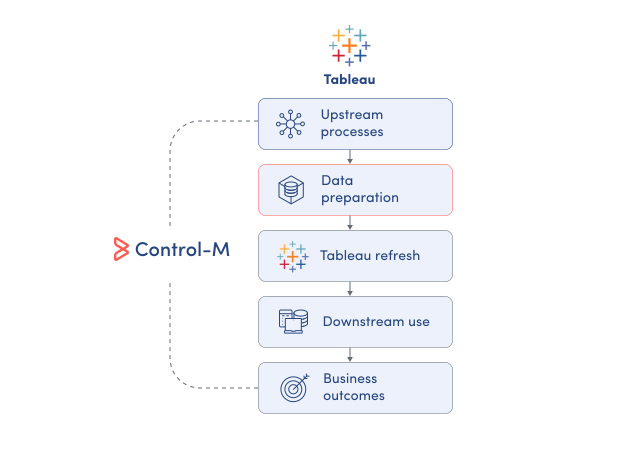
MONITOR ANALYTICS
See Tableau delivery in the full workflow.
Tableau shows what happens inside its analytics environment, but business reporting depends on processes running outside it. Control-M provides one operational view of Tableau execution and the dependencies that determine whether analytics are actually ready:
-
Tableau execution status
-
Upstream workflow dependencies
-
Job results and output
-
End-to-end workflow visibility
-
Failure and delay context
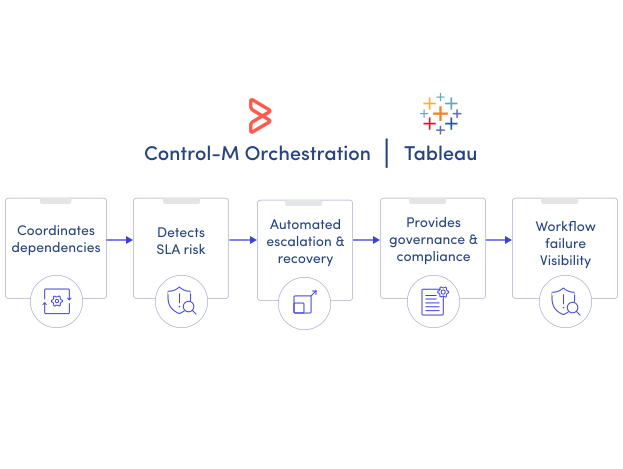
SLA ASSURANCE
Deliver Tableau analytics when the business needs them.
A successful Tableau refresh can still be too late for a reporting deadline. Control-M manages Tableau as part of the end-to-end business workflow, giving teams SLA visibility across the dependencies that determine whether analytics arrive on time:
-
End-to-end SLA tracking
-
Dependency-aware execution
-
Deadline risk visibility
-
Automated failure handling
-
Centralized workflow monitoring
Documentation
Bring order to complex workflows
Learn how Control-M helps teams orchestrate complex processes with greater visibility, coordination, and control.
