Let us know how we can help
Sales & Pricing
Speak to a rep about your business needs

Help & Support
See our product support options
General inquiries and locations
Contact us


 Control-M + SQL Server Integration Services (SSIS)
Your SSIS workflow starts before an SSIS package ever executes — and it can fail when something upstream breaks. An Azure Blob Storage file arrives late. A SQL Server Agent job misses its processing window. Control-M orchestrates the full chain: source data arrival, database preparation, SSIS package execution, and downstream delivery.
common workflow issues
Does this sound like your week?
DATA ARRIVAL
Your 2 a.m. SSIS package started. The Azure Blob file didn’t arrive.
Control-M coordinates file arrival with package execution, so the SSIS workload waits for its required upstream dependency instead of running against missing data. Downstream processing remains gated until the prerequisite completes successfully.
PACKAGE FAILURE
The SSIS package failed overnight. Downstream reporting is already queued.
Control-M detects the failed job state, applies defined recovery actions, and prevents dependent jobs from proceeding prematurely. Operations teams see the failure in the context of the complete workflow instead of discovering broken reports downstream.
CROSS-TOOL DEPENDENCY
SQL processing finished. Your SSIS package is still waiting for its schedule.
Control-M models SQL processing and SSIS execution in the same workflow, using completion status rather than disconnected schedules to control progression. The package starts when its actual prerequisite succeeds, eliminating unnecessary timing gaps.
ENVIRONMENT COORDINATION
The package is ready. The wrong SSIS environment breaks production execution.
Control-M SSIS jobs can specify the SSIS Catalog environment used for package execution, along with configuration files and package properties. Teams can operationalize the correct execution context while keeping orchestration centrally controlled.
SLA RISK
SSIS completed late. Your 7 a.m. analytics handoff is now at risk.
Control-M tracks the SSIS job within the end-to-end workflow and applies SLA management across dependent processing. Teams can identify timing risk before the final delivery misses its business deadline and focus recovery on the affected chain.
Control‑M + SQL Server Integration Services (SSIS)
Control‑M + SQL Server Integration Services (SSIS)
|
workload.types |
SSIS packages (from SSIS Catalog, SSIS Package Store, SQL Server, or File System sources) · SQL scripts · stored procedures |
|
trigger.type |
file arrival · upstream job completion · time schedule · SQL job completion · workflow dependency |
|
cross_tool.deps |
SQL Server job · Azure Blob file transfer · database query · Apache Airflow DAG · downstream analytics handoff |
|
cloud.platforms |
Microsoft Azure · Azure SQL Database · SQL Server · hybrid environments · on-premises infrastructure |
|
error_handling |
configurable retries · connection retries · downstream cascade prevention · dependency conditions · SLA monitoring · failure notifications · recovery actions |
|
throughput |
enterprise batch pipelines · concurrent database connections · scheduled ETL processing · multi-package workflows · high-volume data processing |
|
observability |
centralized job monitoring · workflow status · dependency visibility · SLA tracking · execution history · failure alerts · audit visibility |
end-to-end orchestration
One production workflow. Every tool in the stack.
Control-M orchestrates workflows across SQL Server Integration Services, SQL Server, Azure Blob Storage, file transfers, and analytics services in a single job flow — and coordinates alongside Apache Airflow — with dependency tracking, SLA visibility, and automated recovery across all of them.
- Cross-tool dependency: Azure Blob Storage → SQL Server → SSIS package → analytics handoff
- Data-aware triggers: file arrival, API event, SQL job completion, package completion
|
SQL Server Integration Services |
package execution · SSIS Catalog environment · configuration files · package properties · status monitoring |
|
SQL Server |
SQL scripts · stored procedures · SQL Server Agent jobs · dependency coordination |
|
Azure Blob Storage |
file arrival dependency · upstream data handoff · workflow triggering |
|
Apache Airflow |
DAG coordination · cross-tool dependencies · upstream/downstream orchestration |
|
Managed File Transfer |
secure file movement · arrival detection · delivery confirmation |
|
Analytics services |
downstream triggering · dependency gating · SLA coordination |
airflow coexistance
Control‑M doesn’t replace your Airflow DAGs. It runs the layer above them.
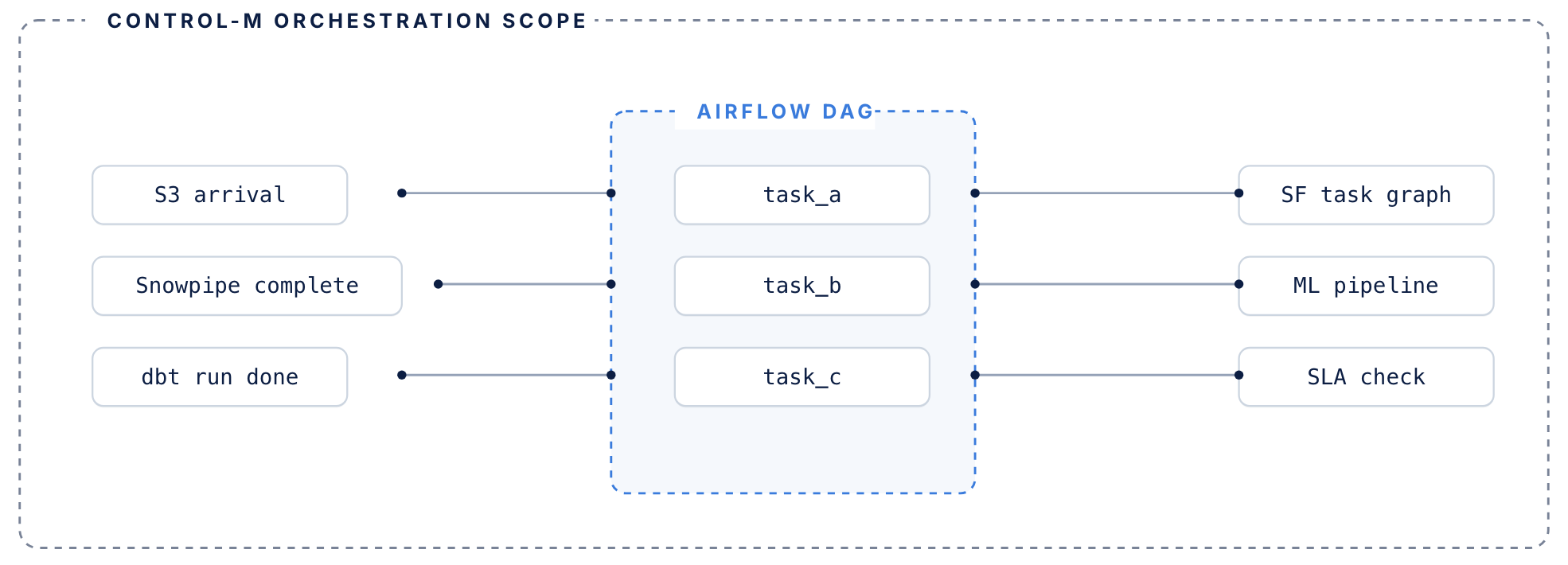
Airflow manages its DAG. Control-M manages everything surrounding it.
airflow handles
DAG-level orchestration inside the data pipeline
- DAG-level task orchestration within data pipelines
- Python operators, sensors, and task dependencies
- Execution graph for jobs that run inside your pipeline
- Manages retries within a single DAG context
control-m adds
The coordination layer around your DAGs
- Coordination layer around DAGs — triggers Airflow based on upstream conditions: file arrivals, API events, other tool completions
- Tracks each DAG’s SLA contribution across the full end-to-end workflow, not just its own routine
- Manages failure recovery when upstream dependencies fail before Airflow even starts
- Existing DAGs don’t need to be rewritten or migrated
MONITOR PIPELINES
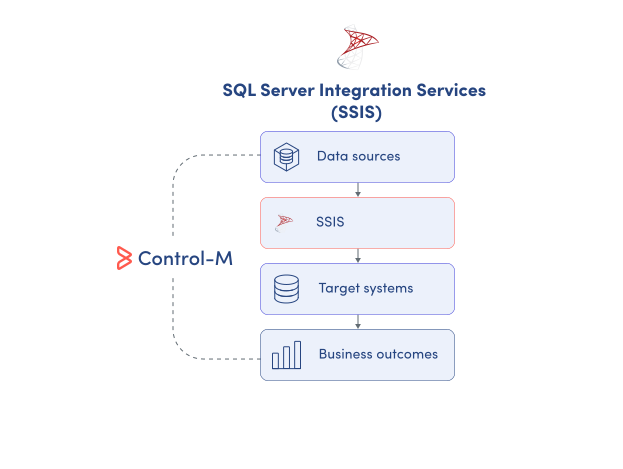
Monitor SSIS execution across the complete data pipeline
SSIS logging (such as the SSISDB catalog) records detailed package executions, but production pipelines rarely stop at SSIS. Control-M gives data teams centralized operational visibility across SSIS packages and the upstream and downstream jobs that determine whether delivery succeeds:
-
SSIS package execution status
-
Upstream and downstream dependencies
-
End-to-end workflow visibility
-
Centralized failure monitoring
-
Execution and runtime history
SLA ASSURANCE
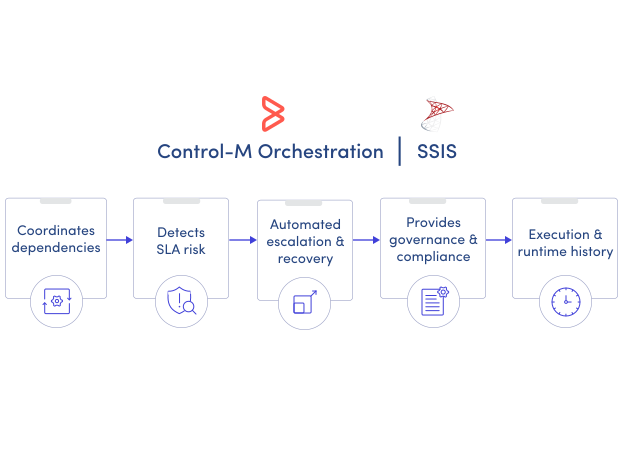
Keep SSIS pipelines aligned with business deadlines
A successful SSIS package can still produce a late business outcome when upstream data arrives late or downstream processing stalls. Control-M manages the package within its complete service workflow so teams can protect delivery commitments:
-
End-to-end SLA tracking
-
Dependency-aware execution
-
SLA risk visibility
-
Automated recovery actions
-
Downstream cascade prevention
