Let us know how we can help
Sales & Pricing
Speak to a rep about your business needs

Help & Support
See our product support options
General inquiries and locations
Contact us


 Control-M + SFTP
Your SFTP workflow starts before a file transfer job ever executes — and it can fail when something upstream breaks. An SAP S/4HANA payment run that doesn’t produce its outbound file. An Oracle E-Business Suite batch that finishes after the partner delivery window. Control-M orchestrates the full chain: outbound file creation, file staging, SFTP transfer, and downstream delivery.
common workflow issues
Does this sound like your week?
FILE ARRIVAL
It’s 2:00 a.m. The partner’s settlement file still hasn’t arrived.
Control-M waits for the required file condition before releasing dependent processing. When the expected transfer is late, downstream jobs remain gated instead of processing incomplete data, giving operations a controlled dependency path rather than another server and schedule to poll.
TRANSFER FAILURE
A multi-gigabyte SFTP transfer fails. Your downstream processing is already waiting.
Control-M detects the failed transfer within the workflow and applies defined recovery actions before downstream processing continues. File-transfer status and application dependencies remain connected, helping operations recover the service without manually coordinating separate transfer and scheduling tools.
UPSTREAM DELAY
SAP finishes late. The fixed SFTP transfer window has already passed.
Control-M ties the transfer to the upstream job’s completion instead of relying on an independent transfer schedule. When SAP finishes, the SFTP step can proceed according to its dependencies, reducing timing gaps between file creation and secure delivery.
ENDPOINT SECURITY
A partner rotates its SSH key. Tonight’s transfers stop connecting.
Control-M centralizes SFTP connection information and supports SSH-based authentication, giving operations a controlled place to manage transfer connectivity. Connection changes can be addressed without rebuilding the end-to-end business workflow that depends on the SFTP endpoint.
OPERATIONS VISIBILITY
The batch failed. Three teams are now asking where the file is.
Control-M brings file-transfer status and related application workflows into one operational view. Teams can see the SFTP step in context with its dependencies, reducing investigation across scripts, transfer consoles, application teams, and disconnected scheduling tools.
INTEGRATION FACTS
Control‑M + SFTP
|
Platform & OS coverage |
UNIX/Linux · Windows · z/OS · Tandem · OS2200 · OpenVMS |
|
Job types supported |
SFTP file transfer · two single endpoints · endpoint-to-endpoint transfer · multi-file transfer (up to 5 sequential transfers per job) · directory & recursive transfer · file watching |
|
SLA monitoring & alerting |
workflow SLA tracking · dependency monitoring · transfer-status monitoring · failure alerting · downstream job control · recovery actions on failure |
|
Audit trail & access controls |
SSH key authentication · password authentication · SSH host authorization (auto re-authorize on signature change) · centralized connection profiles · connection-profile authorization · transfer monitoring |
end-to-end orchestration
One production workflow. Every tool in the stack.
Control-M orchestrates workflows across SFTP, SAP, Oracle, Amazon S3, Azure Storage, Google Cloud Storage, and enterprise applications in a single job flow — with dependency tracking, SLA visibility, and automated recovery across all of them.
- Cross-tool dependency: SAP export → SFTP transfer → Oracle processing → application handoff
- Data-aware triggers: file arrival, upstream job completion, transfer completion, downstream file availability
|
SFTP |
secure file transfer · file watching · transfer status · workflow dependencies |
|
SAP |
upstream job coordination · file creation dependency · downstream triggering |
|
Oracle |
database job coordination · processing dependencies · application handoff |
|
Amazon S3 |
cloud file transfer · source/destination endpoint · workflow coordination |
|
Azure Storage |
cloud file transfer · source/destination endpoint · workflow coordination |
|
Google Cloud Storage |
cloud file transfer · source/destination endpoint · workflow coordination |
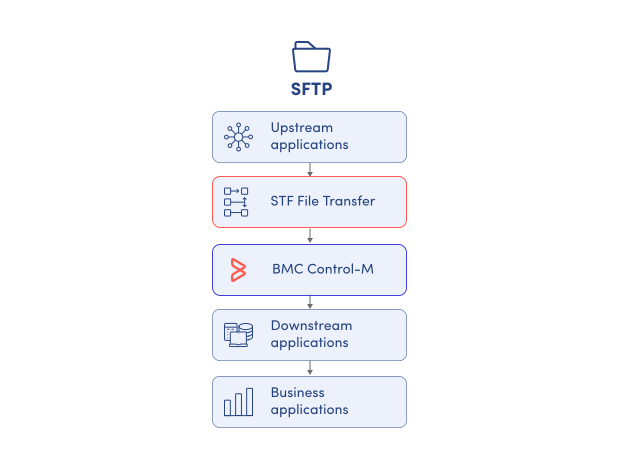
MONITOR TRANSFERS
Monitor SFTP transfers and dependent workflows together.
SFTP confirms file movement, but operations teams also need to understand the jobs before and after each transfer. Control-M provides centralized visibility across file transfers and related application workflows so teams can monitor the complete operational chain:
-
File transfer status
-
Upstream and downstream dependencies
-
Transfer and workflow visibility
-
Failure and recovery status
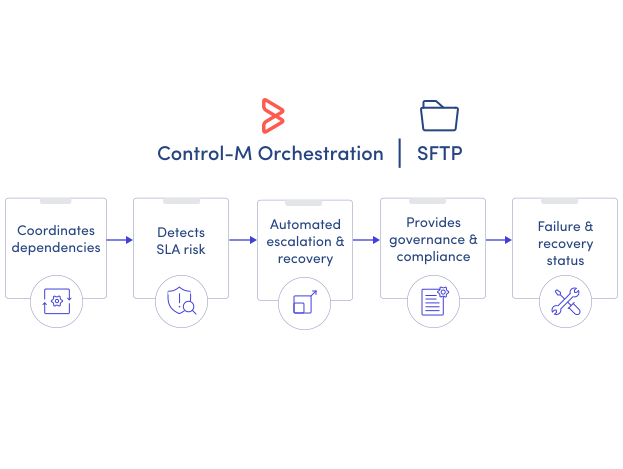
SLA ASSURANCE
Keep SFTP-dependent services running on schedule.
A completed SFTP transfer only covers one step in a business service. Control-M coordinates file movement with the jobs and applications around it, helping operations teams manage dependencies and service timing across the complete workflow:
-
End-to-end workflow dependencies
-
Business service SLA visibility
-
File-aware job sequencing
-
Automated failure handling
-
Centralized operations monitoring
