Let us know how we can help
Sales & Pricing
Speak to a rep about your business needs

Help & Support
See our product support options
General inquiries and locations
Contact us


 Control-M + FTP/S
Your file transfer workflow starts before a transfer ever executes, and it can fail when something upstream breaks. An SAP S/4HANA payment file never reaches its outbound directory. An IBM z/OS end-of-day extract overruns its processing window and misses the scheduled handoff. Control-M orchestrates the full chain: source-file creation, upstream processing, secure file transfer, and downstream delivery.
common workflow issues
Does this sound like your week?
LATE FILE ARRIVAL
The 2:00 a.m. transfer started. SAP still hasn’t produced the file.
Control-M waits for configured file-arrival and upstream job conditions instead of relying only on a scheduled start time. Once the required conditions are satisfied, processing continues automatically, helping prevent premature transfer attempts and unnecessary operator intervention.
TRANSFER FAILURE
Your secure file transfer session dropped halfway through a critical overnight delivery.
Control-M detects the failed transfer and applies configured retry behavior. When supported by the protocol, server, and transfer configuration, it can resume the transfer from the point of failure. Downstream processing remains gated until the required transfer conditions are satisfied, helping contain the operational impact.
FILE INTEGRITY
The transfer completed. The destination file isn’t the size you expected.
Control-M can monitor transfer completion and prevent downstream jobs from starting when a transfer fails. When the Control-M File Transfer Server and supported checksum commands are used, checksum validation can provide an additional integrity check before downstream processing begins.
SLA RISK
The partner file is late. Your downstream settlement window keeps shrinking.
Control-M connects the transfer to the complete business workflow and monitors the modeled service against its deadline. SLA visibility helps operations teams identify emerging delays, investigate affected dependencies, and take corrective action before downstream processing misses its target.
OPERATIONS VISIBILITY
Three transfers failed. Your team is searching separate servers for answers.
Control-M centralizes file-transfer status, source and destination details, traffic load, failures, and related job context through file transfer monitoring. Operators can identify affected transfers and navigate to the associated workflow without manually correlating separate server logs.
Control‑M + FTP/S
Control‑M + FTP/S
|
Platform & OS coverage |
OS400 · Tandem · OS2200 · OpenVMS |
|
Job types supported |
FTP transfer · FTPS transfer · SFTP transfer · file watch · watch-and-transfer · multi-file transfer · directory and recursive transfer · endpoint-to-endpoint file movement · AS2 transfer · cloud bucket-to-bucket / container transfer |
|
SLA monitoring & alerting |
service deadline monitoring · delay visibility · SLA-risk identification · service status · operational alerts · downstream dependency control |
|
Audit trail & access controls |
transfer history · source and destination tracking · transfer timestamps · role-based access control · centralized connection profiles · centralized transfer reporting |
end-to-end orchestration
One production workflow. Every tool in the stack.
Control-M orchestrates workflows across FTP, FTPS, SFTP, SAP, IBM z/OS, databases, cloud storage, and enterprise applications in a single job flow, with dependency tracking, SLA visibility, and automated recovery across the workflow.
- Cross-tool dependency: SAP export → secure file transfer → database load → reconciliation
- Data-aware triggers: file arrival, upstream job completion, transfer completion, downstream readiness
|
File transfer |
file watch · FTP/FTPS/SFTP transfer · transfer-status validation · configurable retry and restart · centralized transfer monitoring |
|
SAP |
upstream job coordination · file-export dependency · downstream workflow trigger |
|
IBM z/OS |
batch dependency · mainframe file handoff · cross-platform workflow coordination |
|
Amazon S3 |
cloud file movement · transfer dependency · downstream processing trigger |
|
Microsoft Azure Storage |
cloud file movement · connection-profile integration · workflow coordination |
|
Databases |
post-transfer query execution · load dependency · processing validation |
|
Enterprise applications |
file handoff · dependency management · downstream workflow execution |
|
Google Cloud Storage |
cloud file movement · transfer dependency · downstream processing trigger |
|
Oracle Object Storage |
cloud file movement · workflow coordination. |
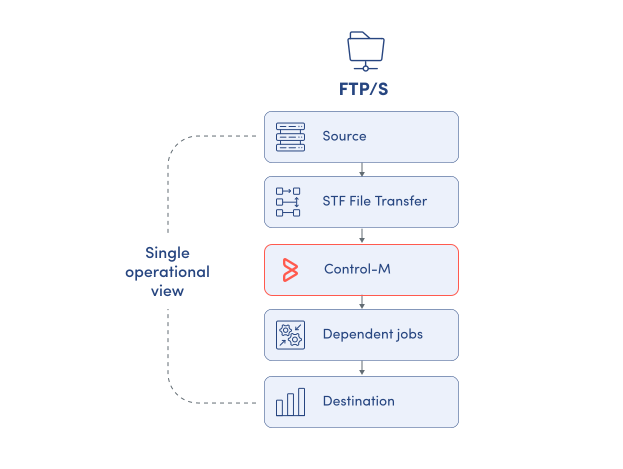
MONITOR TRANSFERS
Monitor file transfers and workflow status together.
Endpoint and server logs show what happened during a transfer, but they do not always show how that transfer affects the wider business workflow. Control-M brings file movement, job execution, dependencies, and operational status into a centralized view:
-
Transfer status and progress
-
Source and destination details
-
Traffic load and active connections
-
Failed and delayed transfers
-
Related workflow job context
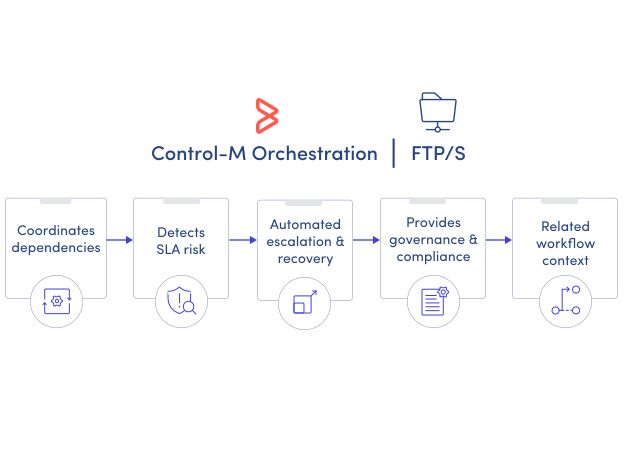
SLA ASSURANCE
Keep file-driven business services on schedule.
A successful file transfer does not guarantee that the end-to-end service will finish on time. Control-M tracks the transfer within the complete business workflow, exposes downstream dependencies, and provides visibility into emerging SLA risk so operations teams can respond before delays affect the business:
-
SLA deadline monitoring
-
Predictive delay detection
-
Dependency-aware transfer execution
-
Configurable retry and recovery
-
Downstream dependency gating
