Let us know how we can help
Sales & Pricing
Speak to a rep about your business needs

Help & Support
See our product support options
General inquiries and locations
Contact us


 Control-M + Azure Batch Accounts
Your Azure Batch workflow starts before a compute task ever runs — and it can fail when something upstream breaks. An Azure Blob Storage input lands late. An Azure Data Factory pipeline misses its processing window. Control-M orchestrates the full chain: Azure Blob data arrival, Azure Data Factory transformation, Azure Batch execution, and downstream delivery.
common workflow issues
Does this sound like your week?
These aren’t edge cases. They’re the normal operating conditions for teams running Azure Batch workloads across multiple tools. Here’s how Control-M handles each one.
DATA ARRIVAL
The Blob arrived late. Your Batch compute started without its input.
Control-M coordinates the upstream file workflow with Azure Batch execution, releasing the compute step only after required dependencies complete. The Batch task starts in sequence instead of relying on an isolated time schedule.
TRANSIENT FAILURE
Azure returned HTTP 429. Your overnight compute chain just stalled.
Control-M can detect configured HTTP response codes, including 429 by default, and rerun the execution step using configurable intervals and attempt counts. Transient Azure throttling is handled systematically instead of becoming an immediate operator incident.
RUNTIME CONTROL
The Batch task is still running. Your delivery window is disappearing.
Control-M supports configurable maximum wall-clock time and status polling for Azure Batch Accounts jobs, while workflow-level SLA monitoring exposes schedule risk. Teams can identify runaway compute before it compromises downstream delivery.
FAILURE RECOVERY
A compute task failed at 2:13 AM. Downstream jobs are waiting.
Control-M monitors Azure Batch status and supports configurable failed-task retries while retaining dependency control over downstream jobs. Task output can be appended directly to Control-M output, giving operators actionable failure context without stitching together separate consoles.
SCALE PRESSURE
The batch window spikes. Dozens of compute jobs need coordinated execution.
Control-M integrates Azure Batch jobs into one scheduling environment with dependencies, resource pools, lock resources, and advanced scheduling. It supports up to 100 simultaneous Azure Batch Accounts jobs per Agent, helping teams coordinate high-volume compute predictably.
Control‑M + Azure Batch Accounts
Control‑M + Azure Batch Accounts
|
API and automation capabilities |
Control-M Automation API · Job:Azure Batch Accounts · connection profiles · task command-line execution · configurable status polling · job-log capture · advanced scheduling · variables |
|
Deployment models & infrastructure flexibility |
Control-M SaaS · Linux Agent · Windows Agent · Azure Batch endpoints · centralized connection profiles · local connection profiles · Azure VM managed identity |
|
Security posture |
Microsoft Entra ID · service principal authentication · managed identity authentication · Azure RBAC · secure connection profiles · external-vault support · client-secret protection |
|
Incident response & MTTR enablement |
HTTP-code reruns · configurable rerun interval · configurable rerun attempts · failed-task retry · maximum wall-clock time · job status monitoring · stdout capture · SLA monitoring |
end-to-end orchestration
One production workflow. Every tool in the stack.
Control-M orchestrates workflows across Azure Batch Accounts, Azure Blob Storage, Azure Data Factory, Azure Databricks, file transfers, and cloud services in a single job flow — with dependency tracking, SLA visibility, and automated recovery across all of them.
- Cross-tool dependency: Azure Blob Storage → Azure Data Factory → Azure Batch → analytics handoff
- Data-aware triggers: file arrival, API event, upstream job completion, transfer completion
|
Azure Batch Accounts |
task execution · status monitoring · task retry · wall-clock limits · log capture |
|
Azure Blob Storage |
file arrival dependency · input handoff · output delivery |
|
Azure Data Factory |
pipeline orchestration · completion dependency · downstream handoff |
|
Azure Databricks |
job orchestration · dependency coordination · compute handoff |
|
Control-M MFT |
managed file transfer · arrival dependency · delivery confirmation |
|
REST APIs |
service invocation · API-driven dependencies · workflow handoffs |
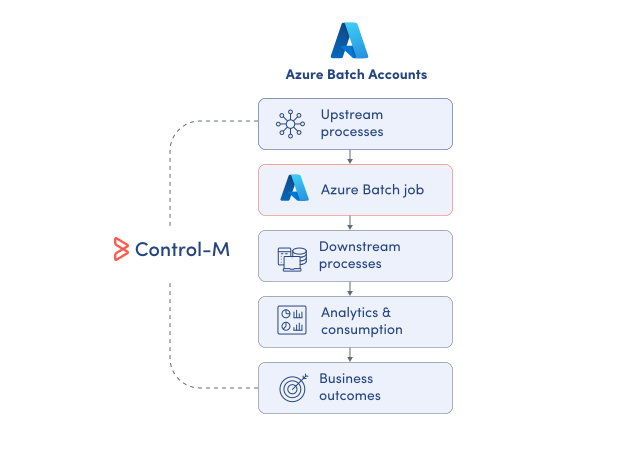
MONITOR COMPUTE
Monitor Azure Batch execution beyond the Batch account.
Azure Batch exposes jobs and tasks inside its own compute boundary, but production workflows usually begin and end elsewhere. Control-M provides centralized visibility across Batch execution and surrounding dependencies, so platform teams can monitor the complete operational chain:
-
Azure Batch job status
-
Task output and results
-
Cross-platform workflow dependencies
-
Runtime and execution visibility0
-
SLA risk indicators
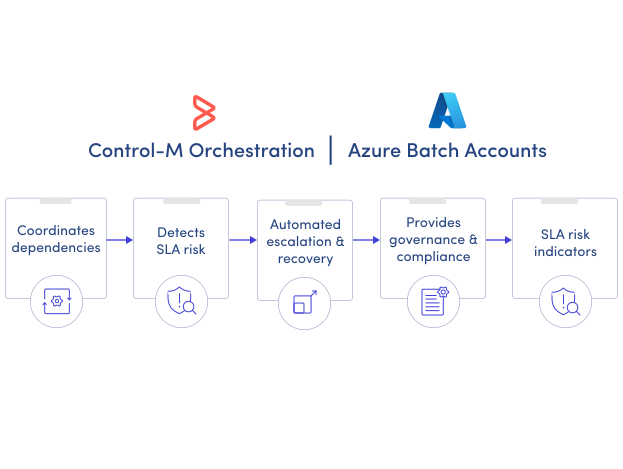
SLA ASSURANCE
Keep Azure Batch compute inside the delivery window.
A Batch task can run correctly and still finish too late for the business process it supports. Control-M connects Azure Batch execution to workflow-level SLA management, helping teams detect schedule risk and control recovery before downstream deadlines are missed:
-
Workflow-level SLA monitoring
-
Maximum runtime controls
-
Configurable task retries
-
Dependency-aware execution
-
Centralized failure visibility
Documentation
Bring order to complex workflows
Learn how Control-M helps teams orchestrate complex processes with greater visibility, coordination, and control.
