Let us know how we can help
Sales & Pricing
Speak to a rep about your business needs

Help & Support
See our product support options
General inquiries and locations
Contact us


 Control-M + Amazon QuickSight
Your Amazon QuickSight workflow starts before a SPICE dataset refresh ever executes — and it can fail when something upstream breaks. Expected data in Amazon S3 arrives incomplete. An AWS Glue transformation runs long. Control-M orchestrates the full chain: source data arrival, upstream transformation, QuickSight dataset refresh, and downstream analytics delivery.
common workflow issues
Does this sound like your week?
These aren’t edge cases. They’re the normal operating conditions for teams running Amazon QuickSight dataset refreshes across multiple tools. Here’s how Control‑M handles each one.
STALE DATA
Your 8:00 AM dashboard opened. Yesterday’s data is still there.
Control-M makes the QuickSight refresh dependent on successful upstream processing, then monitors the refresh status. Business users get dashboards refreshed after the expected upstream workflow completes instead of relying on disconnected schedules and discovering stale information after decisions have started.
UPSTREAM DELAY
AWS Glue ran long. QuickSight refreshed before the new data arrived.
Control-M coordinates the dependency between upstream processing and the QuickSight dataset refresh. The refresh starts only after required jobs complete successfully, keeping late transformations from turning into apparently current dashboards built on incomplete data.
REFRESH FAILURE
The SPICE ingestion failed overnight. Business users opened stale dashboards.
Control-M monitors QuickSight job status, results, and output and uses that execution state within the wider workflow. Teams can identify a failed refresh in context and keep downstream processes dependent on successful completion from proceeding.
SLA RISK
The executive dashboard is due at 7:00 AM. Refresh is slipping.
Control-M connects the QuickSight job to the SLA for the complete business workflow. Teams can identify deadline risk in context and intervene before a delayed dataset refresh becomes a missed analytics delivery commitment.
REFRESH CONTROL
A full refresh ran when only new rows needed loading.
Control-M lets teams run QuickSight full or incremental dataset refreshes and coordinate them with the wider workflow. For supported incremental SPICE datasets, teams can align refresh execution with upstream processing instead of managing it as an isolated schedule.
Control‑M + Amazon QuickSight
Control‑M + Amazon QuickSight
|
Platform & OS coverage |
Amazon QuickSight · AWS Region configuration · AWS account targeting · Control-M · Control-M SaaS |
|
Job types supported |
QuickSight dataset refresh · full refresh · incremental refresh · SPICE ingestion · dataset ID selection · Automation API: Job:AWS QuickSight |
|
SLA monitoring & alerting |
SLA job attachment · advanced scheduling criteria · cross-workflow dependencies · job-status monitoring · business deadline management |
|
Audit trail & access controls |
secure connection profiles · AWS IAM role authentication · AWS access key and secret · external vault integration · AWS account and Region configuration |
end-to-end orchestration
One production workflow. Every tool in the stack.
Control-M orchestrates workflows across Amazon QuickSight, Amazon S3, AWS Glue, Amazon Redshift, Amazon Athena, file transfers, and cloud services in a single job flow — with dependency tracking, SLA visibility, and automated recovery across all of them.
- Cross-tool dependency: AWS Glue → Amazon Redshift → Amazon QuickSight refresh → analytics handoff
- Data-aware triggers: S3 file arrival, AWS Glue completion, Redshift workload completion, upstream job completion
|
Amazon QuickSight |
full dataset refresh · incremental dataset refresh · ingestion-status monitoring · workflow dependency coordination |
|
Amazon S3 |
file-arrival detection · upstream data dependency · workflow triggering |
|
AWS Glue |
job orchestration · completion dependency · downstream handoff |
|
Amazon Redshift |
workload coordination · dependency management · analytics handoff |
|
Amazon Athena |
query workflow coordination · upstream dependency · downstream handoff |
|
Managed File Transfer |
secure file movement · arrival monitoring · workflow integration |
|
Control-M |
advanced scheduling · complex dependencies · SLA management · centralized monitoring |
airflow coexistance
Control‑M doesn’t replace your Airflow DAGs. It runs the layer above them.
The objection is common: “We’re already on Airflow.” The issue isn’t what Airflow does –it’s what happens before and after Airflow runs. That’s where pipelines actually fail.
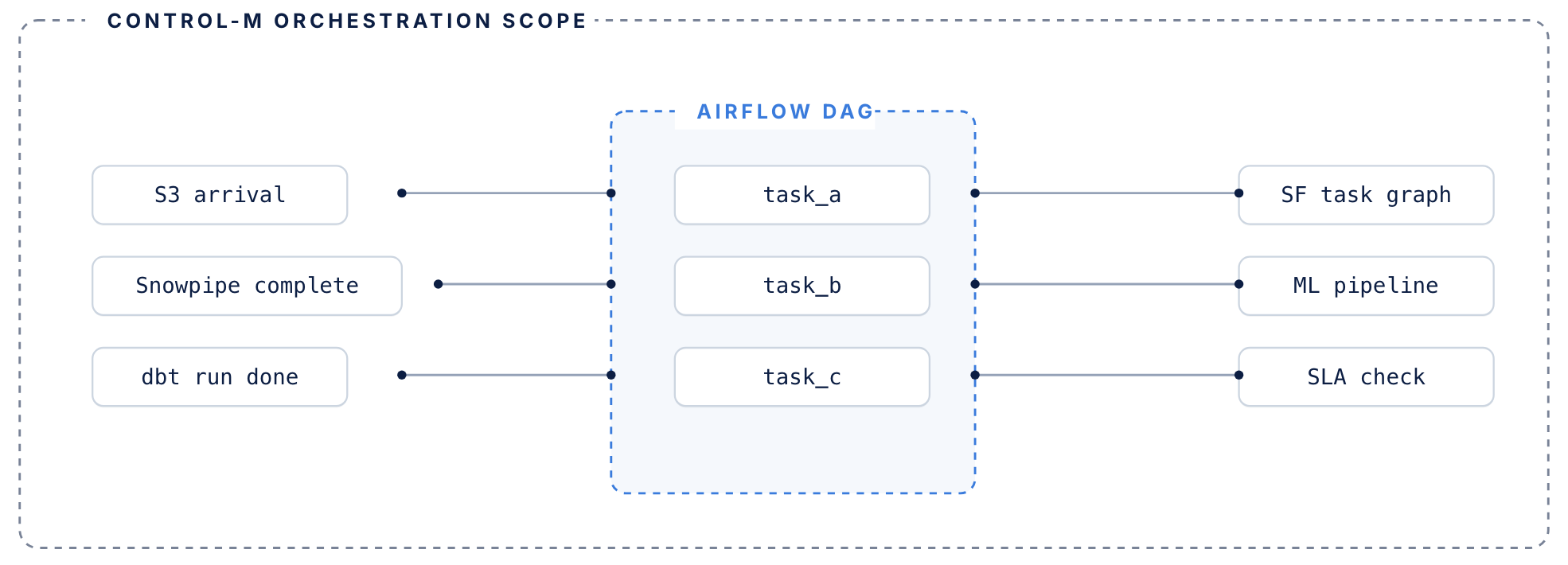
Airflow manages its DAG. Control-M manages everything surrounding it.
airflow handles
DAG-level orchestration inside the data pipeline
- DAG-level task orchestration within data pipelines
- Python operators, sensors, and task dependencies
- Execution graphs for jobs that run inside your pipeline
- Manages retries within a single DAG context
control-m adds
The coordination layer around your DAGs
- Coordination layer around DAGs — triggers Airflow based on upstream conditions: file arrivals, API events, other tool completions
- Tracks each DAG’s SLA contribution across the full end-to-end workflow, not just its own routine
- Manages failure recovery when upstream dependencies fail before Airflow even starts
- Existing DAGs don’t need to be rewritten or migrated

MONITOR ANALYTICS
Know when QuickSight data is actually ready.
QuickSight provides visibility into its dataset ingestions, but your business outcome depends on processes running before and after the refresh. Control-M adds workflow-level visibility so owners can see whether the complete analytics delivery is on track:
-
Dataset refresh status
-
Upstream and downstream dependencies
-
Job results and output
-
End-to-end workflow visibility
-
Business SLA status

SLA ASSURANCE
Keep business dashboards aligned with decision deadlines.
A technically successful refresh can still be too late for the business process it supports. Control-M connects QuickSight execution to end-to-end workflow SLAs, helping teams see delays in context and manage the delivery deadlines business users actually depend on:
-
Business deadline tracking
-
Cross-platform dependency visibility
-
SLA risk identification
-
Centralized workflow monitoring
-
Coordinated failure recovery
Documentation
Bring order to complex workflows
Learn how Control-M helps teams orchestrate complex processes with greater visibility, coordination, and control.
